Pipedrive is a robust CRM (Customer Relationship Management) software designed to streamline sales processes for businesses of all sizes. Launched with a focus on simplicity and effectiveness, Pipedrive has become a popular choice among sales teams worldwide. This comprehensive review explores everything you need to know about Pipedrive, including its intuitive sales pipeline management, customization options, pricing plans, user experience, and customer support. Discover how Pipedrive can enhance your sales efficiency and empower your team to close more deals effectively.
What is Pipedrive?
Pipedrive is a customer relationship management (CRM) software designed to help businesses manage their sales processes efficiently. Founded in 2010 by experienced sales professionals, Pipedrive has grown to become one of the most popular CRM tools on the market. It focuses on visual sales pipelines, automation, and user-friendly interfaces to streamline the sales workflow. This review will cover everything potential users need to know about Pipedrive, from its features and pricing to its performance and customer service.
How Pipedrive Works
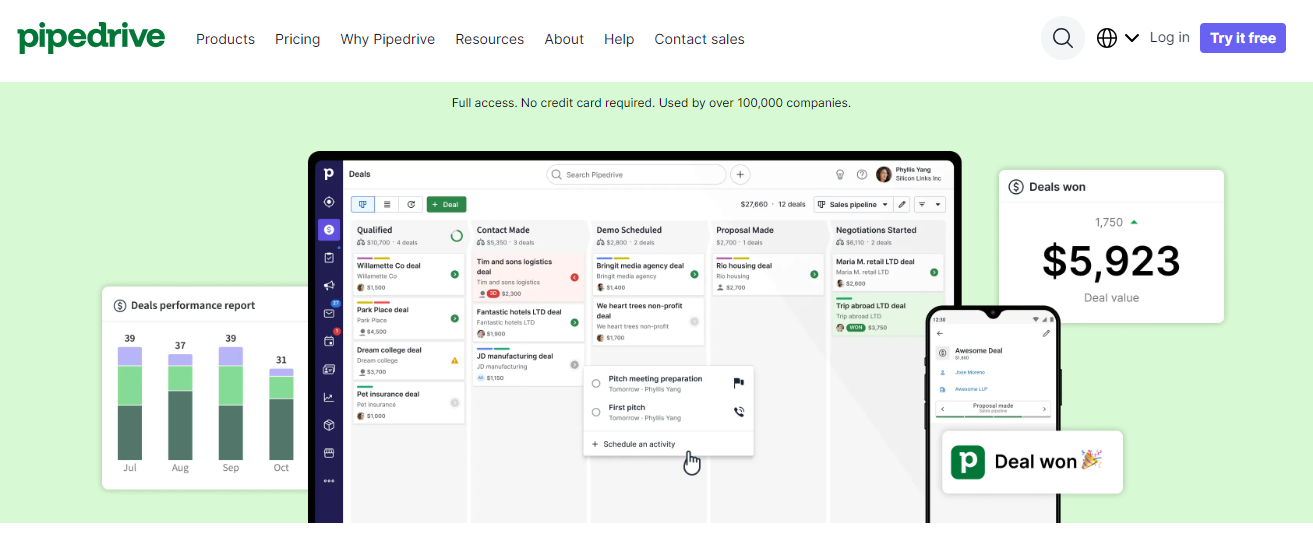
Pipedrive operates on the principle of visual sales pipelines. Users can create and customize pipelines that represent their sales processes. Each pipeline consists of stages that represent different steps in the sales journey. Sales representatives can move deals through these stages by dragging and dropping them, making it easy to visualize progress and manage tasks.
Pipedrive also offers robust automation features. Users can set up workflows that automate repetitive tasks such as follow-up emails, task assignments, and deal updates. The platform integrates with a variety of third-party applications, enabling seamless data synchronization and enhanced functionality.
Pipedrive Core Features
- Visual Sales Pipelines: Pipedrive's core feature is its intuitive visual pipelines. Users can customize these pipelines to match their sales processes, providing a clear overview of where each deal stands.
- Deal Management: Users can add deals, set priorities, and track activities. Pipedrive provides a 360-degree view of each deal, including contact information, communication history, and associated tasks.
- Email Integration: Pipedrive integrates with major email providers, allowing users to send and receive emails directly within the CRM. Email tracking and templates help streamline communication.
- Activity Management: The platform includes a robust activity management system. Users can schedule calls, meetings, and tasks, ensuring that no follow-up is missed.
- Automation and Workflows: Pipedrive's automation capabilities save time by automating repetitive tasks. Users can set up triggers and actions to create custom workflows.
- Reporting and Analytics: Pipedrive offers a range of reporting and analytics tools to help users measure performance. Customizable reports provide insights into sales activities, pipeline health, and revenue forecasts.
- Integrations: Pipedrive integrates with a wide range of third-party applications, including Google Workspace, Microsoft Office, Slack, and more, enhancing its functionality.
- Mobile App: Pipedrive offers a mobile app for iOS and Android, allowing users to manage their sales on the go.
What Sets Pipedrive Apart
Pipedrive stands out from other CRM solutions due to its user-friendly interface and visual pipeline approach. The drag-and-drop functionality makes it easy for sales teams to manage their deals and stay organized. Additionally, Pipedrive's focus on automation helps businesses save time and increase efficiency. The platform's extensive integration capabilities ensure that it can fit seamlessly into any tech stack.
Pipedrive Pricing and Plans
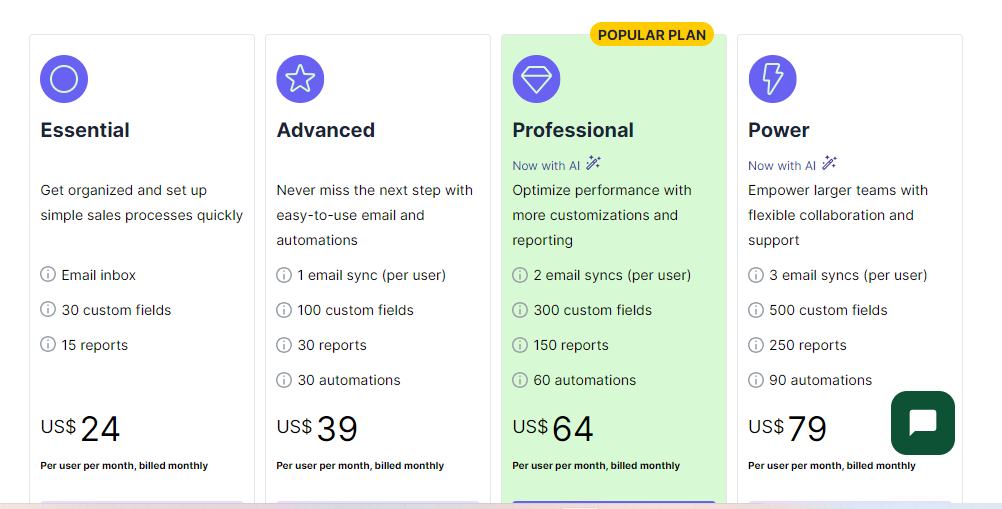
Pipedrive offers several pricing tiers to cater to businesses of all sizes. The plans are:
- Essential: Priced at $14 per user per month, this plan includes core CRM features, email integration, and customizable pipelines.
- Advanced: At $29 per user per month, the Advanced plan adds workflow automation, email tracking, and more advanced reporting.
- Professional: For $64 per user per month, the Professional plan includes advanced reporting and forecasting, team management features, and additional customization options.
- Power: The Enterprise plan, priced at $79.00 per user per month, offers all features, including unlimited customization, enhanced security, and priority support.
Pipedrive also offers a 14-day free trial, allowing potential users to test the platform before committing.
Pipedrive Setup
Setting up Pipedrive is straightforward. Users start by signing up for an account and selecting their plan. The platform offers guided setup options, including importing data from other CRMs or spreadsheets. Users can customize their pipelines, set up automation workflows, and integrate with other tools. The onboarding process is designed to get users up and running quickly, with minimal disruption to their workflow.
Pipedrive Ease of Use
Pipedrive is known for its intuitive and user-friendly interface. The visual pipelines make it easy for users to manage their deals and tasks. The drag-and-drop functionality simplifies deal management, while the customizable dashboards provide a clear overview of sales activities. Pipedrive's mobile app ensures that users can access their CRM on the go, maintaining productivity even when away from the office.
Pipedrive Security
Pipedrive takes data security seriously. The platform employs industry-standard security measures, including data encryption, secure data centers, and regular security audits. Pipedrive is compliant with GDPR, ensuring that user data is handled in accordance with the latest privacy regulations. Additionally, the Enterprise plan offers advanced security features such as single sign-on (SSO) and custom security policies.
Pipedrive Customer Service and Support
Pipedrive offers multiple support options to help users get the most out of the platform. These include:
- Knowledge Base: A comprehensive online resource with articles, tutorials, and guides on using Pipedrive.
- Live Chat: Available for users on all plans, providing real-time assistance for any issues.
- Email Support: Users can submit support tickets via email, with response times typically within 24 hours.
- Phone Support: Available for Enterprise plan users, offering direct access to support representatives.
- Community Forum: Users can connect with other Pipedrive users, share tips, and ask questions.
Pipedrive Additional Features Worth Noting
Custom Fields: Pipedrive allows users to create custom fields to capture specific information relevant to their business.
LeadBooster: An add-on feature that includes chatbots, live chat, and web forms to capture leads from websites.
Sales Assistant: An AI-powered tool that provides recommendations and insights to help users close deals more effectively.
Revenue Forecasting: Advanced reporting tools that help users predict future revenue based on current pipeline data.
Pipedrive Alternatives and How They Compare
Several CRM solutions compete with Pipedrive, including:
- Salesforce: A robust CRM with extensive customization options and integrations, but with a steeper learning curve and higher cost.
- HubSpot CRM: Offers a free tier with essential CRM features, but advanced features require paid plans.
- Zoho CRM: Known for its affordability and extensive feature set, but the interface can be less intuitive compared to Pipedrive.
- Freshsales: Offers AI-powered insights and strong automation features, but may lack some advanced customization options.
Who Is Pipedrive Best For?
Pipedrive is ideal for small to medium-sized businesses that need a user-friendly CRM with strong automation capabilities. It is particularly well-suited for sales teams that require a visual pipeline to manage their deals. The platform's scalability and customization options make it a good fit for growing businesses. However, larger enterprises with complex sales processes may find more value in CRM solutions like Salesforce.
Pros and Cons
Pros:
- User-Friendly Interface: Pipedrive's visual pipelines and drag-and-drop functionality make it easy to use.
- Strong Automation: Automation workflows save time and increase efficiency.
- Extensive Integrations: Pipedrive integrates with a wide range of third-party tools.
- Mobile App: Allows users to manage their sales on the go.
- Affordable Pricing: Competitive pricing plans for businesses of all sizes.
Cons:
- Limited Advanced Features: Some advanced features available in other CRMs may be lacking.
- Customization Limitations: While customizable, Pipedrive may not offer the same level of customization as some competitors.
- Higher Cost for Advanced Plans: The cost of higher-tier plans can be prohibitive for small businesses.
Is Pipe Drive Worth it?
Pipedrive is a powerful CRM solution that offers a user-friendly interface, robust automation features, and extensive integration capabilities. It is well-suited for small to medium-sized businesses looking to streamline their sales processes. While it may lack some advanced features found in other CRMs, its affordability and ease of use make it a compelling choice. With strong customer support and a range of pricing plans, Pipedrive provides excellent value for businesses seeking an efficient and intuitive CRM solution.